Purpose
A study note for myself.
Tools I Use
- Nodejs
- I will use Nodejs as server side foundation. No expressjs or some other fancy libraries here. Only vanilla Nodejs you need to know.
- Curl
- A powerful command line tool to transfer data from or to server. It’s builtin if users are using Mac or Linux OS.
- Chrome
- A happy browser.
Introduction
HTTP protocol is a fundamental when it comes to nowadays web. No matter you are an frontend or backend guy, knowing it is surely an important thing.
In this article, I will cover topics from basic features, headers to useful practices.
HTTP Architecture
In version 1.0, it was multiple connection, which means it opens a new connection per request/response. To solve the overhead of establishing connection for each request/response, version 1.1 comes with persistent connection, which means only uses a single connection for subsequent request/response to solve the establishing overhead.
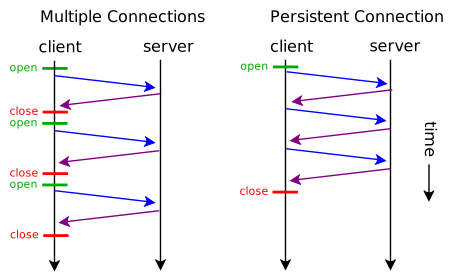
Image from wikipedia.
HTTP Basic Features
- Media independent - Any types can be exchanged between client and server as long as they know what types each other are sending to.
- Stateless - Server won’t record anything about each other, like how long the connection last and blah blah blah… However you can write extra codes to record things.
HTTP Status Codes
When server responses, it returns a 3-digit number back which tells client some kind of informations. Here I only listed partial content. For full list of status code check here.
- 1xx - Pure information to inform client.
- 100 - Continue.
- 101 - Switch protocol.
- 2xx - Success.
- 200 - Ok.
- 201 - Resource is created or request is completed.
- 3xx - Redirection.
- 301 - Moved permanently. Request URI has moved to an new URL.
- 307 - Moved temporary.Request URI has temporary moved to an new URL.
- 4xx - Client error.
- 403 - Forbidden. Requested page was forbidden to access.
- 404 - Not found.
- 5xx - Server error.
- 500 - Internal error. Server met unexpected problem.
- 503 - Service unavailable. Server temporary down.
HTTP Methods
HTTP defines methods to indicate what action should be performed on server side.
- GET - Retrieves data from server with given URI.
- POST - Sends data to server. For example, sending forms, upload files.
- PUT - Creates(if doesn’t exist) or updates target resource with new uploaded one.
- DELETE - Removes target resource with given URI.
- HEAD - Identical to GET, but only interested in head content.
- CONNECT - Converts request into a TCP/IP tunnel.
- OPTIONS - Describes communication options with server.
- TRACE - Echoes received request so that client can see if there are any modification from intermediate servers.
- PATCH - Updates partial modification to a resource.
Here are some examples:
GET
Our server looks like:
1 | var http = require("http"); |
With curl -v http://localhost:3000, you will get:
1 | * Rebuilt URL to: http://localhost:3000/ |
POST
Server:
1 | var http = require("http"); |
With curl -X POST -d @style.css -v http://localhost:3000, server side console prints:
1 | server is running... |
Our style.css on disk looks like:
1 | div { |
HTTP Headers
There are tons of headers http protocol has. Here only list some popular headers. For full list checkout here:
In general, there are three types of header:
- General header - Works with both request and response.
- Connection - Indicates what type of method should be used for communication.
- Date - The time this message was sent.
- Cache-Control - Indicates the conditions to cache or not, which I will cover in practice later.
- Upgrade - Tells what additional protocols it supports and would like to switch if client/server available these protocols.
- Request header - only works with request.
- Accept - What Content-Type it accepts.
- Accept-Encoding - What Content-Encoding it accepts.
- Cookie - By using cookie header field, client can send cookie to server.
- User-Agent - Client’s identity. For example, Mozilla/4.0, IE/10.0…
- Response header - only works with response.
- Content-Encoding - Tells what type of encoding has been applied to the entity body(explanation).
- Etag - Used to tag version or identity for a file.
- Expires - Gives a date after which the response is considered stale.
HTTP Headers in Practice
Content-Encoding
Content-Encoding is often used in sending files with minimal size as possible. Imagine a scenario you have minified all of your files - your html, css and js. All things look great, right? But actually, you can take it further by enabling Content-Encoding with gzip.
Server:
1 | var fs = require("fs"); |
Send request by using Chrome

As you can see, the file size has reduced from 3.7kb to 2.0kb, which is roughly 50% size reduction.
Cache-Control
Server:
1 | var fs = require("fs"); |
Header field Cache-Control: private, max-age=8 means only cacheable on client machine and cache it for 8 seconds.

Our css file is cached thanks to Cache-Control.
Note: By clicking refresh icon, Chrome will send a request with header Cache-Control: max-age=0 which will force Chrome itself to refetch files it requests. If you want to see cache behaviors, press enter in the URL search bar instead.
http-equiv
Not everyone is able to reach server configuration. In order to access request header, a typical usage in frontend is via http-equiv
1 | <meta http-equiv="refresh" content="2"> |
With http-equiv, you can do almost what you can do as on the server side.